
Readable tests are an important thing when developing and maintaining Python applications. For many years, the unittest module produced plain, monochrome text output, which was sometimes difficult to read when test suites grew larger.
Since Python 3.14, the unittest module now adds color to its output by default when the terminal supports ANSI colors. Test statuses such as successes, failures, and errors are highlighted, making it easier to spot problems at a glance without extra tooling.
Consider a small calculator implementation:
calculator.py
class Calculator:
    def add(self, a, b):
        return a + b

    def subtract(self, a, b):
        return a - b
Here is a simple test:
test_calculator.py
import unittest
from calculator import Calculator


class TestCalculator(unittest.TestCase):
    def setUp(self):
        self.calc = Calculator()

    def test_add(self):
        self.assertEqual(self.calc.add(2, 3), 5)

    def test_subtract(self):
        self.assertEqual(self.calc.subtract(5, 3), 1)


if __name__ == '__main__':
    unittest.main()
Run the test:
python -m unittest test_calculator.pyWhen executed in a color-capable terminal, the test runner automatically applies color styling to its output, making pass/fail indicators easier to distinguish.
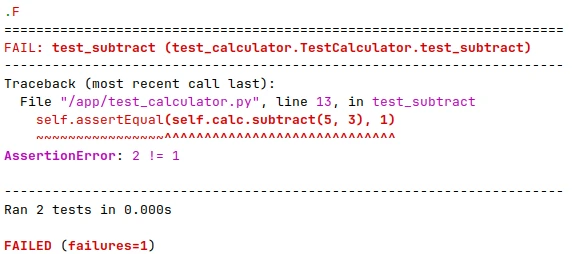
Colored output is helpful during local development. There are situations where plain text is preferable, such as CI pipelines, logging, etc.
We can turn off colorized output for unittest by setting the NO_COLOR environment variable before running the test:
NO_COLOR=1 python -m unittest test_calculator.pyWith this variable present, the test runner reverts to traditional monochrome output, even if the terminal itself supports colors.



Leave a Comment
Cancel reply