
For years, the Python interactive shell (also known as REPL) displayed everything as plain text, leaving developers to mentally parse keywords, strings, and numbers without any visual cues. Since Python 3.14, the interactive shell highlights syntax by default. Python keywords, strings, numbers, and other language elements are displayed in different colors when the terminal supports ANSI coloring. This makes experimenting with code, debugging small snippets, and learning Python more comfortable - right out of the box.
Launch the interactive shell as usual:
pythonIn a color-capable terminal, keywords, strings, and numbers are highlighted automatically. This helps visually separate different parts of the code and reduces mistakes when typing interactively.
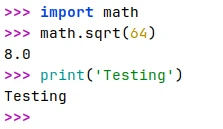
Colored output is useful for most interactive work, but there would be situations where plain text is preferred.
By setting the NO_COLOR environment variable, we can disable syntax highlighting in the interactive shell.
NO_COLOR=1 python

Leave a Comment
Cancel reply