
RustFS is an open-source, high-performance, distributed object storage system built with Rust, designed to securely store and manage large volumes of structured and unstructured data such as documents, media files, backups, logs, and application assets.
This tutorial explains how to install RustFS inside a Docker container on Linux. Commands have been tested on Ubuntu.
Prepare environment
Make sure you have installed Docker in your system. If you are using Ubuntu, installation instructions can be found in the post.
Install RustFS
Before starting, create directory for data:
sudo mkdir -p /opt/rustfs/dataSet user, which ID is 10001 as owner for newly created directory:
sudo chown -R 10001:10001 /opt/rustfsNote: it doesn't matter that user (ID: 10001) doesn't exist on host system. This user will be created in the container.
- Host network
Run the following command to create a container for RustFS that uses host network:
docker run -d --name=rustfs --restart=always --network=host \
    -v /opt/rustfs/data:/data \
    -e RUSTFS_ACCESS_KEY=root \
    -e RUSTFS_SECRET_KEY=pwd12345 \
rustfs/rustfs- User-defined bridge network
User-defined bridge network can be used for listening on different port. By default, the RustFS service listens on port 9000 for API requests and on port 9001 for the web UI. These ports can be changed with -p option.
docker network create app-netdocker run -d --name=rustfs --restart=always --network=app-net \
-p 8080:9000 \
-p 8081:9001 \
-v /opt/rustfs/data:/data \
-e RUSTFS_ACCESS_KEY=root \
-e RUSTFS_SECRET_KEY=pwd12345 \
rustfs/rustfsNote: don't forget to change secret key.
Testing RustFS
Open a web browser and navigate to http://<IP_ADDRESS>:9001/rustfs/console, replacing <IP_ADDRESS> with the IP address of the system. Sign in to the web interface using the access key (account) and secret key.
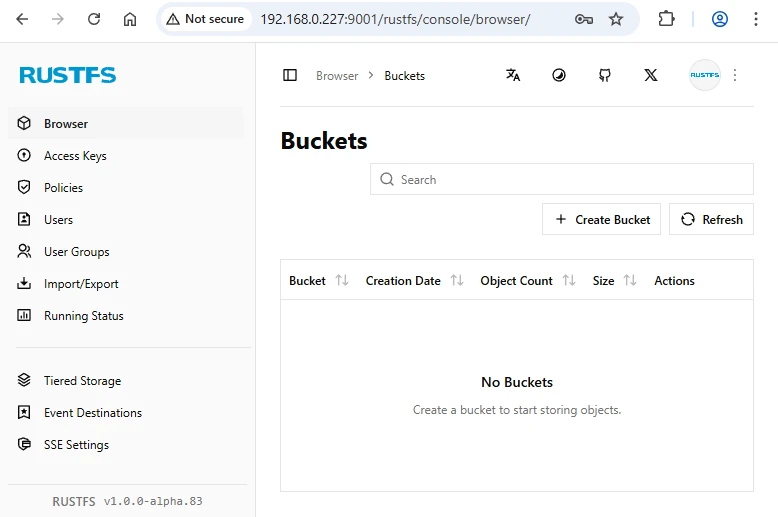
We can use the following command to verify that the RustFS API is accessible:
wget -Sq http://<IP_ADDRESS>:9000/healthReplace <IP_ADDRESS> with the IP address of the system. A 200 OK response indicates that the RustFS API is up and running properly.
Uninstall RustFS
To completely remove RustFS, remove its container:
docker rm --force rustfsRemove RustFS image:
docker rmi rustfs/rustfsYou can also remove RustFS data:
sudo rm -rf /opt/rustfsIf a user-defined bridge network was created, you can delete it as follows:
docker network rm app-net

Leave a Comment
Cancel reply